Category Archives: Personal

Viruses, trojans, and worms

..are every where these days and for me I can gladly say I’ve not had to worry about them. Maybe it’s cause I’m lucky, maybe it’s cause I don’t get much spam… really it’s true, or maybe it’s cause I don’t wonder what the email could really be about from someone that I’ve never heard of. Better yet with a sender or subject that are not actual words.

Delete em don’t look at em … if it was worth reading it would make sense !!!

Then you have the phishing email asking you to confirm personal information… are you kidding me !!! If a stranger knocked on your door saying he was from your bank, asked you to fill out this form with information they already have… you’d really do that ??? Come on if common sense says don’t do it in person why does the internet make it ok.

And of course just putting a machine on the internet with no firewall can be dangerous. What was it 30 minutes ? Microsoft put an unprotected machine on the internet and in 30 minutes it was compromised … at least I remember that from a Microsoft paid advertisement for XP on G4Tech TV.

Some ammunition about why you should have a firewall can be found on Microsoft’s TechNet but that is not to say they should only be used for Windows® based machines. You should have one period.

This brings me to my latest personal challenge, cleaning a machine that is infected. A friend was having trouble with a PC when it accessed the internet. Luckily they had Norton Anti Virus Software so it would catch anything that would come in but it did not stop the annoying pop adds nor the rogue processes that would bring there surfing to a screeching halt. Now I can honestly say I am no expert at this but I did learn from it.

The short version of the long story is with help from SpyWare Doctor, the Internet and good old Safe Mode the machine is back to normal… for now. I say for now cause there is still an issue with Internet Explorer, did not have time to completely research and fix, but surfing is no problem with Mozilla’s Firefox and email is working.

So it’s not a perfect fix but does get them up and running till it’s replaced, which should be soon. With some help from Zone Alarm for a firewall their experience should be uninterrupted.

I’ve put in my two cents for replacing it with a Mac. Since pictures and video are on the list of important features they could be a convert. I did not mention LINUX cause that did not seem to be a good fit for what they use a PC for… but in time it will.

March 21 update ..

Well after hearing back from the friends what I thought was fixed was not. After a few minutes of surfing internet access was bogged down by rougue tasks from some executables in \windows\system. Funny how Norton and SpyDoctor did not detect them. But I had a feeling that might happen, task manager just didn’t look right. I went ahead and installed SpyBot to try another angle, which helped. I also took the time to research the tasks a little more carefully with some help from Answers That Work which pretty much took care of any questions I had about something being legit. After tweeking msconfig, getting rid of the registery entries that were bogus it now appears everything is back to normal.

We’ll see …

An LCD at last

Yes I’m a little slow at times but I just didn’t want to give up my 21″ CRT until I found a good replacement. Thanks to the brother in law I was able to move up from a 15″ to the 21″, and WOW what a difference. Even though it could only due 1024 x 768 still it made a lot more room on the desktop. I was glad to use it for the last few years. At least I think that’s how long I’ve had it.

Sitting at the computer for 8 + hours means you need a good keyboard, screen and chair. I have no problems with the keyboard and chair. The last couple weeks though the monitor has been getting on my nerves. I think mainly cause the office is going to get redesigned soon and the 75lb monitor that takes up a big chunck of the desk is well, getting in the way. So to take a break the other day I headed up to Best Buy to check out what they might have. I really wasn’t going to buy anything either just wanted to see what I could get for the $300 – $400 dollar range. Needless to say I should not have gone.

I did not check any reviews on flat screens, I had not gotten that far yet. But when walking by the flat screen displays I knew I was in trouble. LG’s Flatron L1920P, 19″ flat screen with USB ports plus analog and digital outputs, $450 with rebates.

I wasn’t even going to go that big, I thought 17″ would be enough. But at that price, with digital, well lets just say I did not expect it. Yes it was an impulse buy but that price was only good for another day and they had one box left. Now maybe I could have done just as good or even better with a Dell or a NEC, but it’s not like I work with video all day. Using the digital output is great and the screen is excellent.
It’s been only a few days now and at this point I can say I’m feeling good. Now in three months when LCD prices drop and I could have gotten the same thing for $50 less, well then I might have to second guess the impulse by. But for now it’s worth it.

Now as long as I don’t do the same thing with the truck !!!!

Carrying your laptop

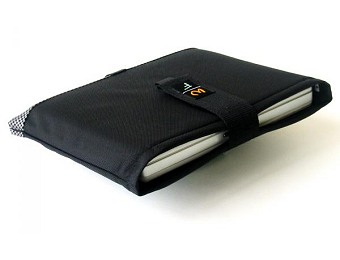
Now that I’ve had the new laptop for a while I’ve found myself doing a little traveling and in need of some type of carrying case. I have a Targus Notebook Backpack but that has so many pockets I find myself throughing everything in except the kitchen sink. Of course since the new laptop has a 12 cell batter and I’ve been getting 4 – 6 hours out of it I figured it was time I went with something a little lighter. So after hearing about a sleeve on a forum or two I went searching and I must say I found a great company with a great product.

My requirements were the laptop needed to fit snug and provide protection, but that’s it. No need to worry about pockets to carry cables or cords, just make it simple. After a bit of searching I ran across a place in San Francisco called Waterfield Designs. This company makes a variety of protective cases for laptops, ipods, ipod gear, keyboards, cables and wallets. I’ve had it now for about a month and it is great. What I got was a Sleeve Case exactly like the one pictured. Made from high grade neoprene with ballistic nylon shell it is rugged and looks great at the same time. You can select from 14 different laptop manufactures with all there current models and customize features such as orientation, closing flap, sholder strap, or a piggy back.

If you have a similar need and are looking for something unique, this is it. Not to mention they are made in the USA, at $45.00 with no extras it was well worth it.

New laptop for the new year

With the new year hear decided it was time to lay the IBM (i1200) to rest and replace it with something current. It has been a great workhorse for the last three years and took it’s share of abuse. What finally did it in was my attempt to inspect and fix a broken LCD hinge, needless to say it is broke and I don’t want to fix it that bad. It went through a number of configurations and has had a number of OS’s.

WinME
XP Pro
SUSE 9.0, 9.1
Fedora Core 2, 3

.. and it didn’t miss a beat with any.

I had two drives for it, a 20gb and a 10gb, but only 192mb of ram (64 + 128) and a Celeron 700. It had no on board NICs and only a CD ROM.

Well for the replacement I wanted to at least try and find something that had a little more punch from the get go. I’d have to put up some more cash but if it lasted longer, in the end it would be worth it. Yes I know it’s technology, you should never think that way… ;)

I did as much research as I could on brands, styles, and guts but each time I thought I’d found it I’d have to come back to my first choice Compaq’s v2000. I had seen the r3000’s and even purchased on for my mom but the v2000 is a little different. For me I had only a handful of requirements.

1. Had to run Linux.
2. Decent battery life.
3. Good keyboard.
4. Stylish.

5. Good resolution.

Three through five I did not have much trouble with but one and two, well those were going to be the tough ones. I will say my i1200 did just fine with all of these except #2 but as it goes Linux tends to do a little better with hardware that’s been out for a while. That is unless you compile kernels and modify code, but that I do not do.

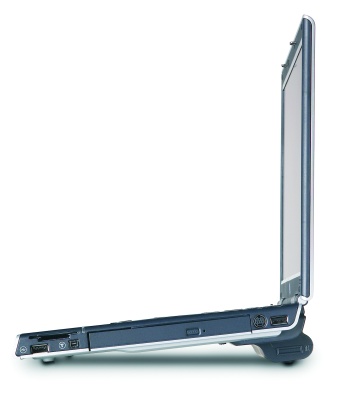
I spec’d the v2000 out from http://www.hpshopping.com with the standard config with two exceptions, 1gb of RAM and a 12 cell battery. A note about the 12 cell it does not form fit to the bottom of the laptop like the 6 cell. It raises the base up about a inch and a half. At first this disapointed me but after a few hours of use I was over it. The angle the battery puts the laptop at makes it better for typing, IMHO.

Here is a sample image that was found on hpshopping.com.

So after two weeks I can say it was an excellent choice. As you can see below sound is currently not working, it did under FC2 but not on any of the current FC3 kernels. At the moment it is not a priority so for me it’s not a concern.

Spec's
Feature        Installed                   Working
-----------    ------------------------    ------------
OS             Fedora Core 3 (2.6.9-1)
Hard Drive     60GB
Processor      Intel Pentium M 1.4ghz
RAM            1GB
CD/DVD         Sony CD/DVD CRX830E         Yes

Firewire       Texas Instruments           No (Unknown device not tested)
Ethernet       Realtek 8139/8139C/8139C+   Yes
Wireless       Intel Pro 2200BG            Yes.. see http://ipw2200.sourceforge.net
Mouse          Synaptics TouchPad          Yes.. with add fuctions (hoz & vert scroll)
Sound          Intel 82801DB               No
Video          Intel 82852/855GM           Yes.. current res 1024 X 768

To get a better idea of the size here is another pick I took from http://www.notebookreview.com/.