Category Archives: Personal

Move to a new server

I noticed yesterday afternoon problems sending email, same old smtp connection issue that crops up from time to time. Normally I don’t think anything of it as my hosts forum comments about domain email traffic and what they will do about it. This ran into the evening and I also noticed no email being received. Guess I shouldn’t complain about ‘not’ receiving my regular spam but you never know when something important will show up.

So I headed off to the forum. I didn’t see anything current about email issues but did notice some posts about domains on servers using a specific administration tool. It peeked my interest since one of the tools mentioned is the same tool that comes up when I log into mine. Some further reading mentioned shutdown dates that had since past. Hummmm, server to be shut down, date has past and my site is still up…. do I really want to know the answer, do I want to be surprised when the site goes down. I think naught.

It might be good to mention at this point it’s getting somewhat late and trading emails with support over the next couple days was not where I wanted to go. Not to mention Kay was starting to complain about email… we don’t want that to keep up. I would later realize the move wasn’t really necessary but in the long run it was for the best.

So time to migrate, following directions for moving. I backed up the blog database, pulled down all the files from the static pages and signed up with 8-95.com. Within minutes the confirmation emails showed up, and no email was not fixed yet I used a non habbenet account. After logging in and creating the accounts, (I keep passwords in a list cause you can’t remember them all) I moved all the files to the new host and the static pages tested fine. Udpated DNS at Network Solutions and then started in on restoring the blog.

Restoring the blog is where things got interesting. I use WordPress and their is a world of info about upgrades, migrations, etc but I didn’t think I’d need it. Well as it turns out I did need it as I’m no MySQL expert. The easy part was uploading the files, creating the database and running through the install. The problem came when attempting to login and receiving “.. you are not authorized to view this page”. That was the last thing I figured I’d run into.

Now comes some digging and even though I’d rather not be doing it theirs no reason to panic. I have a backup of everything and it was working before the backup, so it will work again. Also the amount of info that’s available from how to’s, forums, and documentation I should be able to find help. A quick google pointed me to a number of resources but none of them did the trick. After a little more searching and I ran across this post that pointed me to some of the sql tables and how others made changes for their problems.

Once I checked the tables it was nothing more than a simple rename on some rows where the old database prefix was referenced. With the move to the new host I couldn’t keep the old table prefixes when creating the database, but I didn’t think some rows within the tables would be affected. Live and learn. As of this afternoon the DNS changes seem to be propigating quickly mail is back up and all is good.

rdesktop … connection refused !

Last week as my work load seemed to increase I found a need to remote access my XP_SP2 machine. As the laptop is Ubuntu I needed remote desktop, no problem so I thought. Since rdesktop comes as a standard package I didn’t think anything about having problems, but when my first attempt said “connection refused” I thought hummmmmmm.

A quick check of the remote desktop service to make sure it was running and a test with VNC, which was successful, and I was scratching my head. That is until I googled a little and checked to see if terminal services was running, nope. Start em up and you should be good.

And yes I’d rather put in the extra time from the deck or the couch than sitting at the desk.

Edgy a few days early

With the next version of Ubuntu to be releasted in a few days thought I’d go ahead and load it on an extra drive for kicks. What’s nice about this version is the iso is a Live CD which you can then install. I had to do a double take at first when I took the default option on boot and we went straight to the desktop. The install was quick and immediately prompted for 70 plus updates. All major hardware was recognized and no special configuration was required. How cool is it when stuff works !!

The only quirk at the moment is the Alt key on the right side of the keyboard doesn’t seem to be working. A quick change of the keyboard identification didn’t help so I may need to check on that. Otherwise it’s all good.

Go’in all wireless

Ever since the move I’ve debated about bringing cable into the office. This past weekend I decided it was time to do something about it. After checking the outlet in the bedroom, it was split with cable running on the floor, it did not come from the attic. That pretty much told me I needed to go wireless.

Yes I did not want to split, run up the wall and through the attic then back down to the other side.

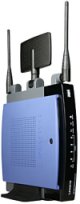
Linksys WRT300N

So it was off to Curcuit City for a new router with wireless and a wireless PCI for the work PC. An important less I forgot here was do some research first before these kinds of purchases it can save you time and money.

The selections to choose from were Linksys, D-Link, Netgear and Belkin.

My current router is a Netgear MR314, it has served me well for the last 5 year but I figured if I was going wireless on the work PC I should be current. I decided on Linksys’s WRT300N and their WMP300N PCI card. I would later learn one of those choices was not the best. I was able to move the cable modem, router and the test server out of the office which was another reason for going wireless. Setup was quick and initial tests with VPN into the office were good.

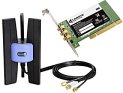
Linksys PCI WMP300N

But then, after about 5 minutes, the PC froze. A hard reset was the only choice and after coming back up it repeated. The uptime would vary between 5 to 15 minutes depending on internet usage. Like I said do some research first cause a quick google took me to the Linksys forums and problems with the WMP300N. No need to go into all the specifics but a driver problem with the Broadcom chipset seems to be the root of it and no update from Linksys at this point in time. So back to the store for another card and we are up and running, no freezes. Signal strength is not as good as the Linksys, as the external antenna of the WMP300N does help, but after a full day of using it I don’t see a difference from wired.

Finally a test server

For some time now I’ve been wanting to have a test server I can dedicate to a DMZ. Thanks to the parents for looking to donate an old tower system and I can make that work.. It was a good opportunity to try the Edgy server install but that didn’t go so well. The load went fine but the boot was toast. That might have been something to dig into but I was looking to get it up and I just didn’t feel like it was worth the effort at the time. So I settled on the server install. No problems their, added a few packages and then installed Plone. I’ve been a fan of this product for some time and still believe it is an excellent content management package out of the box. An entry I made a few months back mentioned a backup for a site at work and that’s complete.

I have some other plans for it as well related to general storage. It’s great to have a place where I can put stuff now and not worry about it. The access as a DMZ is also a plus when on the road. The drive is only 20GB but for now that will do the trick.